Flutter Arabic RTL support: what a bilingual esports app taught me
- Published
- Reading
- 5 min read
- Author
- Mohamed Magdy IbrahimFlutter Technical Lead
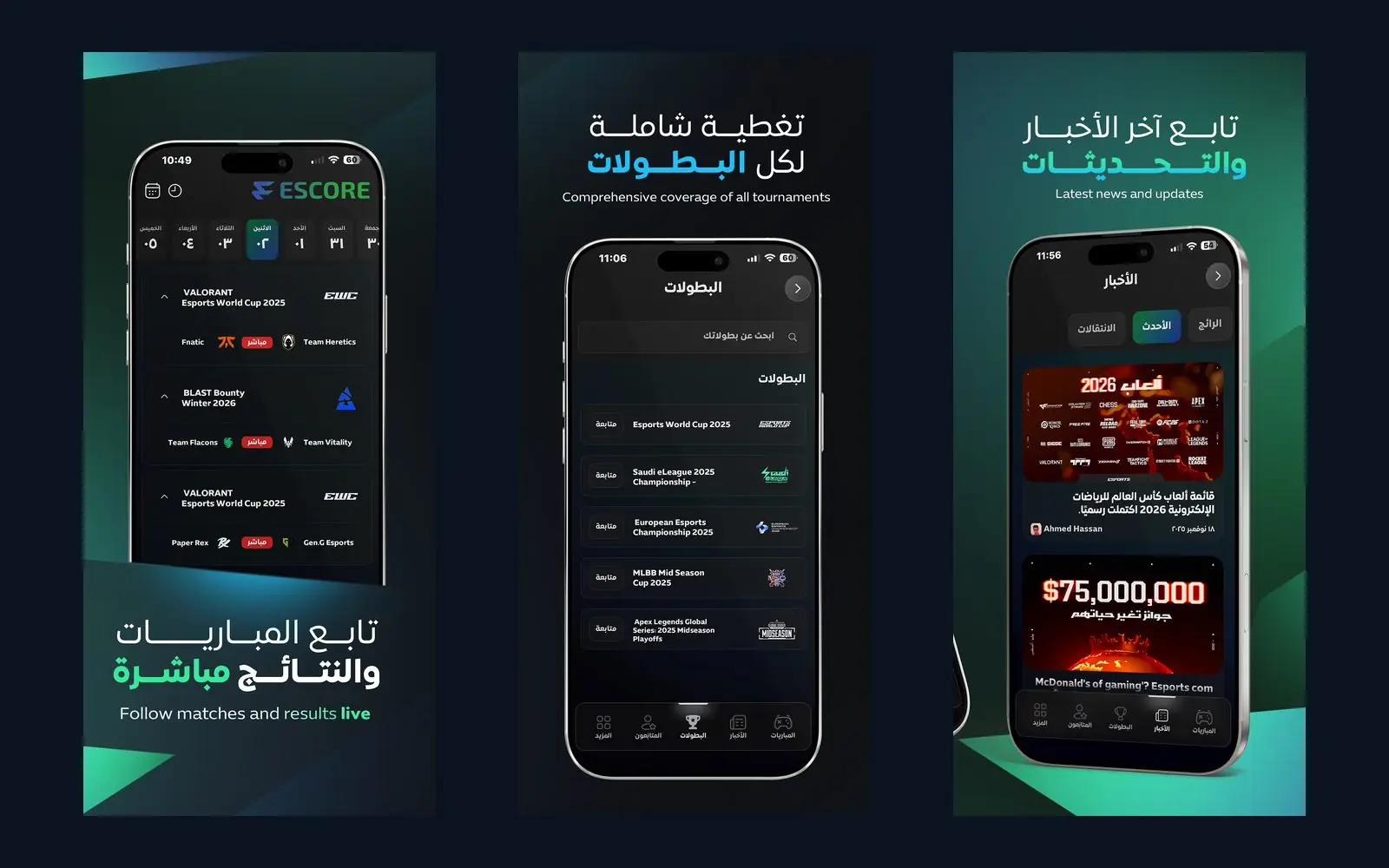
Flutter Arabic RTL support is mostly free: set the locale to Arabic and Flutter mirrors your rows, app bars and list tiles for you. The bugs live in the parts you wrote assuming one direction, and the nastiest one is a score. I learned that on Escore, the esports app I led in Flutter, where users switch between Arabic and English at runtime and the whole interface flips without a restart.
Below, "we did" means it is documented in a shipped app. "I check" means a working list I apply to any Arabic app, with snippets you can run.
Why "2 - 1" can render as "1 - 2"
Escore is a live esports platform I worked on for a year, August 2025 to August 2026, for Rov Group, a Saudi startup. Almost every screen puts Latin team and tournament names (Fnatic, Team Heretics, VALORANT Masters London 2026) inside an Arabic interface, next to scores and a "live" badge. You can see it in the matches screen on the store listing.
Flutter's text engine follows the Unicode bidirectional algorithm. Digits are weakly typed, and the spaces and hyphen between them are neutral. Put "2 - 1" as one string inside a right-to-left paragraph and the neutrals take the paragraph's direction, so it renders as "1 - 2". Correct if the first team sits on the right, wrong if your layout puts it on the left.
My default is one Text per value inside a Row, so visual order follows the row. When it has to be a sentence, wrap the foreign run in Unicode isolates:
// U+2068 FSI ... U+2069 PDI: isolate a name of unknown direction
// U+2066 LRI ... U+2069 PDI: force left-to-right for the score
final line = 'فاز $team بنتيجة $home - $away';
Digit shapes need a decision as well: Eastern Arabic (٠١٢) or Western (012). intl's DateFormat and NumberFormat take them from locale data, and ar, ar_SA and ar_EG can disagree. Choose deliberately and test the exact locale you ship.
The reverse case is Sound to Read, an app that teaches children aged 6 to 12 to read English: Arabic interface, English content. Its store screenshots show the letter grid starting with A at the top right while the pronunciation word list reads left to right. Every English block wants an explicit textDirection: TextDirection.ltr, and letter order is a product call to make with the client.
Flutter Arabic RTL support starts in l10n.yaml
On Escore I owned the app from architecture to store release, and my colleague Mahmoud Hamdy built the backend and admin dashboard. The brief asked for Arabic right to left to work as well as English. It serves more than 5,000 registered users, 74% on iOS and 26% on Android, from one codebase, so a direction bug ships to both platforms at once, and so does the fix. More in the Escore case study.
The setup is short. flutter_localizations knows Arabic is RTL and sets Directionality at the top of the tree; the code generator gives you a typed AppLocalizations.
# pubspec.yaml
dependencies:
  flutter_localizations:
    sdk: flutter
  intl: any
flutter:
  generate: true

# l10n.yaml
arb-dir: lib/l10n
template-arb-file: app_en.arb
output-localization-file: app_localizations.dart
nullable-getter: false
nullable-getter: false saves you a null assertion on every lookup. Codegen runs on flutter pub get, flutter run or flutter gen-l10n.
If your translator only receives English one/other pairs, expect the Arabic equivalent of "3 match". CLDR defines six Arabic plural categories, and ICU syntax in the ARB file handles them:
{
  "matchesCount": "{count, plural, =0{لا توجد مباريات} =1{مباراة واحدة} =2{مباراتان} few{{count} مباريات} many{{count} مباراة} other{{count} مباراة}}"
}
A language switch that does not need a restart
Many people in the region run their phone in English and would rather read match news in Arabic, so following the device language is not enough. Escore switches at runtime. Make the locale app state and let MaterialApp rebuild; I use a Cubit because BLoC and Cubit are how I manage state (Tarkibat is built the same way).
class LocaleCubit extends Cubit<Locale> {
  LocaleCubit(this._prefs) : super(Locale(_prefs.getString('lang') ?? 'ar'));
  final SharedPreferences _prefs;

  Future<void> change(String code) async {
    await _prefs.setString('lang', code);
    emit(Locale(code));
  }
}

BlocBuilder<LocaleCubit, Locale>(
  builder: (context, locale) => MaterialApp(
    locale: locale,
    supportedLocales: AppLocalizations.supportedLocales,
    localizationsDelegates: AppLocalizations.localizationsDelegates,
    home: const HomeScreen(),
  ),
);
SharedPreferences suits one small value, and Escore already used it for local storage next to Hive. Escore's theme system also covers light and dark mode in both languages; since locale and theme are both app-wide, I prefer MaterialApp to read them from the same place.
The codebase audit: sides, icons, fonts
When I inherit a Flutter project I grep for left:, right:, centerLeft, centerRight and TextAlign.left. Each hit is a direction bug waiting for its first Arabic user, or an exception that deserves a comment. The fix is the directional twin:
Padding(
  padding: const EdgeInsetsDirectional.only(start: 16, end: 8),
  child: Align(
    alignment: AlignmentDirectional.centerStart,
    child: Text(t.liveNow, textAlign: TextAlign.start),
  ),
);
PositionedDirectional(top: 8, end: 8, child: badge);
Icons follow meaning. Back, forward and "next" chevrons mirror; clocks, check marks, a media play button and team logos do not. Icons.arrow_back carries matchTextDirection and flips itself, while custom assets need Transform.flip(flipX: isRtl, child: ...). In Escore's screenshots the tournaments screen's back chevron sits top right pointing right, and the logos stay as drawn.
Fonts come last in the audit but bite first in reviews. A good Latin face rarely has good Arabic glyphs, so set the font per locale in ThemeData. Keep letterSpacing at zero for Arabic, since spacing breaks the joins between letters, and give it a slightly larger height so dots and diacritics are not clipped. For users on slow mobile networks, as many of Escore's are, I would bundle the font rather than fetch it on first launch.
What I test before a screen ships
On Escore I kept unit, widget and integration tests across the core features. Both languages belong in that suite: the cheapest useful test pumps a screen in Arabic and in English and fails on overflow. By hand, I check:
- the yellow overflow stripe in both locales, with the longest translation on every button
- a runtime switch and a return to the same screen
- every line that mixes Latin names and numbers, read as an Arabic reader would
- Arabic and English typed into every field
- the switch on a low-end Android phone
That last one matters because a locale change rebuilds the whole tree. I profiled Escore with Flutter DevTools on that kind of device, and smooth on a developer's phone can mean stutter on a user's.
If you are planning an Arabic-first app and want people who have shipped one, see our Flutter app development service.
Send us a short brief through the project form.
Share
More on the same topic
| No. | Date | Article | Topics | Reading |
|---|---|---|---|---|
| 04 | App development cost in Saudi Arabia and Egypt, and what really drives it | 8 min read | ||
| 03 | Building a live score app backend: WebSocket, rooms and three data providers in Escore | 7 min read |